The most recent release is shown first.

November 2026 - Version 1.1.39 Released

  • Sales by User Today now supports From and To dates for reviewing invoicing activity over an inclusive date range. Today Only is selected by default; changing a date switches to a date range, and ticking Today Only and clicking Apply returns to today's figures. Summary wording and Excel output follow the selected period.
  • Stock Policy Planner now has an editable Top limit, allowing users to view and copy more than the previous fixed Top 200 items.
  • Added Include Items With No Sales to Stock Policy Planner, allowing items without sales history in the selected period to be included in the dashboard and Excel output, within the selected Top limit.
  • Monthly Sales Analysis now offers last month compared with the same month last year, and current month to date compared with the full same month last year.
  • Added removable customer-code exclusions in Settings for Monthly Sales Analysis, making it easier to exclude internal sales across company databases.
  • Removed the scheduled 30-day app sign-in expiry and improved sign-in messages. Normal licence checks continue to apply.

September 2026 - Version 1.1.38 Released

  • Changed the Inventory Availability Viewer Dashboard to show product quantities on the left-hand side of the columns, after code, description and group information.
  • Changed Inventory Availability Viewer so multiple inventory groups can be selected instead of only one group or all groups.
  • Order Watch, Invoice Watch, Quotation Watch and Price Watch, Live Sales Feed, Live Product Sales, Order Line Up and Order Fulfillment dashboards now have an alerts feature which shows any new lines where the product or document line is below the target GP% or below cost. This is useful if someone has added a product incorrectly or received stock in at a higher price or entered a new document line with a low GP% or below cost. Live Sales Feed and Live Product Sales tell you if new entries have occurred in the last 3 hours. Order Line Up will alert you to new orders added. Order Fulfillment will alert you to orders that were not fully deliverable but can now be fully delivered on the latest refresh, this could be due to incoming stock arriving. The alert appears on the dashboard tile in the top menu via an amber or red warning or green positive entry and then also in the dashboard itself as the new lines are highlighted to the user. The alerts only operate if the filters have remained the same on a refresh of data. They are removed on the next refresh so only new alerts get displayed.
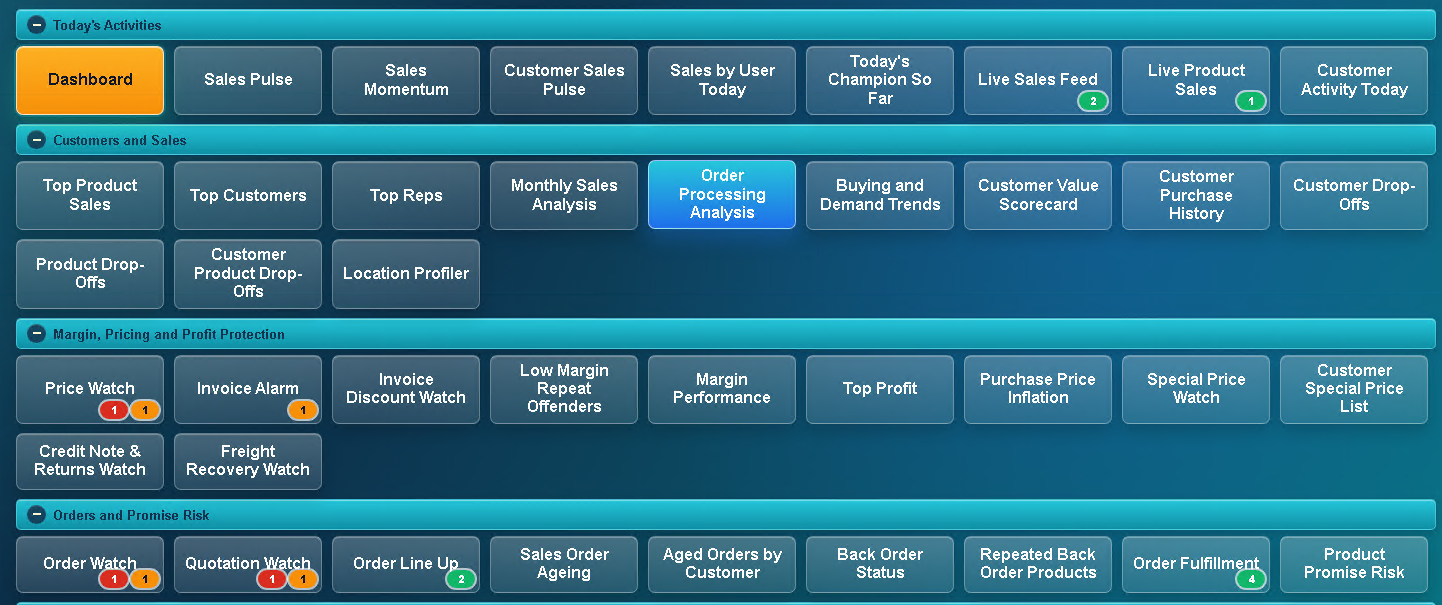
  • Dashboard menu showing red, amber and green alert badges on selected dashboard tiles.
  • Changed the Low Margin Repeat Offenders Dashboard, Job Profit Watch, Active Job Sales & Margin and Job Costs by Type so they do not load on refresh and now they are on demand dashboards to make the refresh process quicker.
  • New Dashboard - Order Processing Analysis.

September 2026 - Version 1.1.37 Released

  • Dead Stock Dashboard enhanced to include Qty on SO, Qty on PO, Last GRV Qty and Last GRV Date.
  • Permission added for being able to see Costs in Inventory Availability Viewer.
  • New Dashboard - Monthly Sales Analysis.
  • New Dashboard - Buying and Demand Trends.
  • New Dashboard - Stock Ageing Analysis.

August 2026 - Version 1.1.36 Released

  • Added improved session handling so expired website app sessions can be cleared locally without unlinking the installed app.
  • Improved database registration diagnostics so website/API errors show clearer detail when a database registration fails.
  • Added grouped linked-account viewing to Customer Purchase History, making it easier to review head office and branch purchasing activity.
  • Improved linked-account support so grouped customer branches can be expanded and reviewed more clearly.
  • Improved Sales Order Ageing, Aged Orders by Customer and Order Fulfillment so service items are treated as deliverable.
  • Added Prior Full Months Only, Show Gains and Drill Down options to the drop-off dashboards.
  • Improved Customer Drop-Offs and Product Drop-Offs with drill-down views showing related products/customers and traffic-light results.
  • Added an option to compare current-period sales using any rep, useful where customers or products were previously handled by a selected rep but may now be sold by others.
  • Added lookup exclusions in Settings for customer groups and warehouses, helping keep selection lists tidy without excluding them from "All" dashboard totals.
  • Added validation so the default warehouse cannot also be hidden from warehouse lookup lists.
  • Renamed the revisions link to "See What's New" and improved its visibility in Settings.
  • Added a Jump to Top button on dashboards for faster navigation back to the dashboard menu.
  • Improved drop-off drill-down percentage logic for gains and losses.
  • Updated sales-history calculations to handle Sage 200 Evolution two-stage sales order invoicing, excluding Goods Issue Voucher rows and counting normal/customer invoice rows only.

August 2026 - Version 1.1.35 Released

Dashboard Improvements

  • Improved Stock Policy Planner with product search, 12/24 month period options, better sorting, and corrected sales quantity calculations.
  • Improved Purchase Price Inflation and related cost inflation reporting to help show whether supplier cost increases are being recovered through margins.
  • Improved debtor dashboards with clearer tiles, better charts and more useful risk views.
  • Added more flexible “Top” limits across dashboards so users can view more or fewer rows where needed.

Stock and Purchasing Refinements

  • Added options to exclude BOM components from selected stock dashboards.
  • Improved shipment dashboard compatibility with older import/shipment table versions.
  • Improved goods-in-transit warehouse handling in warehouse quantity views.
  • Refined stock and sales calculations to better handle invoice, POS invoice, credit and return document types.

Fixes

  • Fixed several SQL parameter issues affecting dashboards with Top limits.
  • Fixed older SQL Server compatibility issues, including removing unsupported functions where needed.
  • Fixed dashboard loading and repeated apply issues in several dashboards.
  • Fixed customer drop-off and inventory availability filtering behaviour.
  • Fixed several chart and layout issues across the newer debtor and business insight dashboards.

August 2026 - Version 1.1.34 Released

  • New Dashboard - Cash Expected.
  • Largest Overdue Invoices Dashboard now uses the customers ageing period and terms which was built into Cash Expected.
  • Added tiles to the top of Customer Sales Pulse, Sales by User Today, Live Sales Feed, Live Product Sales and Customer Activity Today.
  • Top n box added for Back Order Status Dashboard.
  • Fixed an issue where it would not allow over Top 1000 on many dashboards.
  • New Dashboard - Profit Opportunity Finder.
  • New Dashboard - Executive Health Score.
  • New Dashboard - Biggest Business Risks.
  • New Dashboard - Hidden Profit.
  • New Dashboard - AI Recommendations.
  • New Dashboard - Business Scorecard.
  • New Dashboard - Cost Inflation Impact.

August 2026 - Version 1.1.33 Released

  • New Dashboard Added - Inventory Availability Viewer.
  • New Dashboard Added - Customers With No Credit Limit.
  • New Dashboard Added - Credit Limit Utilisation.
  • New Dashboard Added - Debtor Aging Risk.
  • New Dashboard Added - Average Days To Pay.
  • New Dashboard Added - Largest Overdue Invoices.
  • New Dashboard Added - Customers Approaching Credit Limit.

August 2026 - Version 1.1.32 Released

  • Created an improved navigational dashboard menu with the dashboards put into relevant categories.
  • Category headings disappear if dashboards are hidden or not allowed by the account owner.
  • Now when clicking on a dashboard you will be taken directly to the start of the dashboard instead of having to scroll down.

August 2026 - Version 1.1.31 Released

  • Made many dashboards now have a box for Top n records so the user can change how many top records they want to see.
  • Changed the Customer Drop Offs Dashboards so that it deals better with the Rep on Transactions setting.
  • New Dashboard Added - Import Costs Watch.

July 2026 - Version 1.1.30 Released

  • Dead Stock Dashboard does not show items recently purchased with no sales.
  • The Special Price Watch and Customer Special Price List Dashboards now have a tick to only see inventory records with a VDC contract.
  • Location Profiler Dashboard now has the ability to view by Products sold in that area with a blue plus to then see the customers who were sold to, but now you can also view it by Customers sold to and the blue plus will then show the products sold to them.
  • Location Profiler Dashboard now has the ability to enter multiple text entries separated by a comma.
  • Stock Runway was splitting stock items when an Inventory Group was selected and warehouses combined. This has been fixed.
  • Freight Recovery Watch Dashboard was not showing different months selected, for example 6 or 24 months. This has been fixed.
  • Margin Performance now shows/export columns as Previous then Current as that reads better.
  • Customer Purchase History Dashboard now shows tiles at the top showing number of Inv/Crn transactions, Total Value and the Average Transaction Value.
  • Customer Purchase History Dashboard now includes linked customer accounts when selecting the head office.
  • Customer Drop-Offs now includes linked customer accounts when selecting the head office.
  • Customer Product Drop-Offs now includes linked customer accounts when selecting the head office.
  • The Main Account/Owner can log in to their account page on the website and now set the default dashboards that invited users are allowed to view and once they accept their invite the main account/owner can tweak the dashboards that they can see if required.

July 2026 - Version 1.1.29 Released

  • Top Products Dashboard changed to Top 100 from Top 50.
  • Products Drop Off and Customer Product Drop Offs now have the ability to select only drop offs for items currently in stock.
  • Dead Stock Dashboard now has an upper tile showing the current value of stock or value of selected warehouse / stock group and then shows percentage of dead stock against it.
  • Purchase Price Inflation was incorrectly reporting the purchased quantity; this is now fixed.
  • Sales Order Ageing Dashboard now has an added traffic light system at expanded line level to indicate deliverable, after supply or insufficient stock.
  • Moved Business Improvement Insights Dashboard to be at the end of the list of dashboards.
  • Made automatic refresh licence checks more tolerant of temporary website/network timeouts, allowing up to 5 consecutive auto-refresh check failures before interrupting dashboards.
  • Added coloured tile accents to several existing dashboards.
  • Field headings now stick to the top of the page in dashboards when scrolling down where possible.
  • Settings Guide button has been moved to the top of the Settings page.
  • New Dashboard Added - Quotation Watch.
  • New Dashboard Added - Product Lead Times.
  • New Dashboard Added - Location Profiler.
  • New Dashboard Added - Repeated Back Order Products.
  • New Dashboard Added - Product Promise Risk.
  • New Dashboard Added - Supplier Reliability Scorecard.
  • New Dashboard Added - Customer Value Scorecard.

July 2026 - Version 1.1.28 - First commercial version launched

The first commercial S200Dashboards.io version includes the following dashboards:

  • Sales Pulse
  • Sales Momentum
  • Customer Sales Pulse
  • Sales by User Today
  • Today's Champion So Far
  • Business Improvement Insights
  • Live Sales Feed
  • Live Product Sales
  • Price Watch
  • Invoice Alarm
  • Invoice Discount Watch
  • Low Margin Repeat Offenders
  • Freight Recovery Watch
  • Credit Note & Returns Watch
  • Order Watch
  • Order Line Up
  • Sales Order Ageing
  • Aged Orders by Customer
  • Back Order Status
  • Order Fulfillment
  • Manufacturing Queue
  • Manufacturing Demand
  • Build Requirements
  • Dead Stock
  • Stock Exposure
  • Stock Runway
  • Stock Policy Planner
  • Stock Below Safety
  • Negative Stock Watch
  • Margin Performance
  • Data Quality Watch
  • Duplicate Product Watch
  • Purchase Price Inflation
  • Supplier Delivery Performance
  • Customer Drop-Offs
  • Product Drop-Offs
  • Customer Product Drop-Offs
  • Customers On Hold
  • Debtor Watch
  • Debtor Risk Sales
  • Email Hygiene
  • Transaction Search
  • Customer Activity Today
  • Customer Purchase History
  • Special Price Watch
  • Customer Special Price List
  • Top Product Sales
  • Top Profit
  • Top Customers
  • Top Reps
  • Job Profit Watch
  • Active Job Sales & Margin
  • Job Costs by Type